Before discussing about the difference between core i3, i5 and i7, we should discuss about the difference between core to duo and core i3 processor. It will help us out to understand the basic distinguishing factor.
Difference Between Core 2 Duo and Core 2 Quad
Core 2 Duo is a dual core processor and can run two independent
processes at the same time. It can run two processes at a time. Hence,
total number of parallel threads that can run on Core 2 Duo is 2.
Core 2 Quad is a quad core processor. That means that four different
processors are built into one processor chip and can run four
different processes at the same time. There can be 4 parallel
processes that this processor can execute.

Difference Between Core 2 Duo and Core i3
As Core 2 Duo technology has been here for some time, Core i3 is
targetted to replace Core 2 Duo in the market pretty soon. Both Core 2
Duo and Core i3 are dual core processors and can run two processes at
the same time. The main difference between these two is the number of
threads. Two cores on Core 2 Duo are single threaded while Core i3 has a
dual thread running capability on each core. Hence total number of
threads that can run on Core 2 Duo is 2 and 4 threads in total can run
on Core i3.
Difference Between Core 2 Quad and Core i5
Core 2 Quad and Core i5 are both quad core processors, that is, four
cores in one processor chip. This necessarily means, they can run four
different processes at the same time. Both of them can run four
threads at the same time too. Whats the difference then? The
difference is somewhere else. The difference is
Turbo Boost technology. Core 2 Quad does not have Turbo Boost Technology, while Intel Core 5 has Turbo Boost enabled.
Intel Turbo Boost Technology
Intel
Turbo boost technology is a smart way of over
clocking the processors. Gamers and enthusiasts around the globe have
been using tricks to overclock their processors to get better speeds.
This fact has become so popular that Intel has included
Turbo Boost
as their native feature. Whenever the processor is over loaded and
reached its 100% processing limit, Intel Turbo Boost tehcnology comes
into play. It increases the processor’s core frequency by 133 MHz after
random and frequent intervals. The processor frequency continues to
increase till the upper limit for the processor Turbo is reached. The
upper limit is the maximum overclocking frequency that is allowed by
Intel.
You may end up frying your processor if you dont stop there.

Difference Between Core i3 and Core i5
Intel Core i3 is a dual core processor while Core i5 is a quad core
processor. While Core i3 can run total of 4 threads and 2 processes at
a time, Core i5 can run 4 threads and 4 processes at a time. Intel
Core i3 is necessary a next version of Core 2 Duo while Core i5 is the
next version of Core 2 Quad.
Difference Between Core i5 and Core i7
Am I getting redundant here? Not really. Intel Core i5 is a quad core
processor that can run four processes at a time, while each process
can run only one thread. While Intel Core i7 can run four processes
and eight threads at the same time on its four cores. So you can say
that Core i5 has uni-threaded four cores, while Core i7 is a quad core
processor with each core running hyper threading technology.
Difference between FSB (Front Side Bus) and DMI (Direct Media Interface)
Front Side Bus – FSB
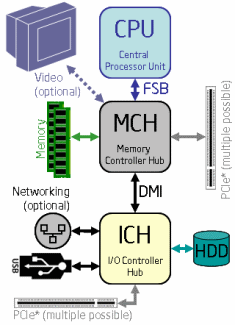
FSB is a BUS technology that is used in Core 2 Quad/Duo processor
technologies and earlier. FSB allows the processor to communicate with
other components of the computer including Memory, PCIe, Video as well
as IO devices like USB, Hard disk, Network etc. Everything that goes
in and out of the processor goes through FSB. See the diagram below to
see a typical Core 2 Duo processor and FSB communication channels.
Direct Media Inteface – DMI
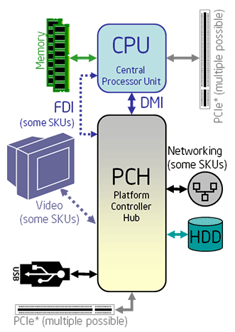
DMI bus technology is used in Intel Core i3, i5 and i7 processors.
The basic difference in architecture is, that the processor communicates
over a different channel with RAM, a different channel with PCIe and a
third channel DMI to communicate with all other components of the
computer. This increases the performance significantly. See diagram
below for a typical Core i7 architecture.
To buy or not to buy the new Processor
As it name only clears that it is some kind of technology that boost
(empowers) the performance. If you are a normal user and dont do alot of
number crunching, you may not find a significant difference between
these processors in day to day use but if you are a power user and do a
lot of DVD ripping, video conversion, extreme 3d gaming, mp3 and
video editing, photo conversion, programming or even file compression
(zip or rar etc), you will need a faster processor. Go for a top of
the line processor if your current machine is out of date but the
price of these processor drops faster than the apple falling from a
tree. So watch out and dont spend too much on a processor.
I’ve tried to simplify the comparison between these processors in
this article but if you think not enough detail has been given, please
go through the following table that has been taken from Intel’s website
and it compares five different processors, one example from one
technology each.
Processor Comparison Table
This table has been taken from Intel’s website.

Processor Comparisons